
WhatsApp is one of the most popular messaging apps in the world, with over 2 billion users. Many people have more than one phone number, and they may want to use different WhatsApp accounts for different purposes.
For example, you may want to have a personal account and a business account, or you may want to use different accounts for different groups of friends or family.
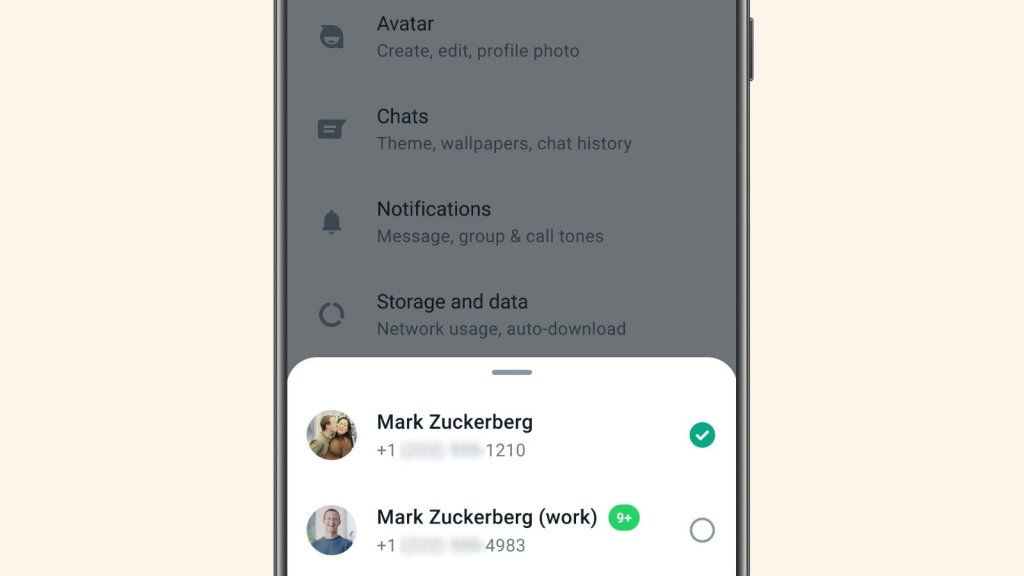
Fortunately, WhatsApp has recently introduced a feature that allows you to have two accounts on one phone, and switch between them easily. In this blog, I will show you how to set up and use this feature, and what are the benefits and limitations of having multiple accounts on WhatsApp.
How to set up multiple accounts on WhatsApp
To set up multiple accounts on WhatsApp, you will need two things: a phone that supports dual SIM cards, and two phone numbers that are not already registered with WhatsApp. If you have these, follow these steps:
- Open the WhatsApp app on your phone.
- Tap on your profile photo in the top right corner to open the settings menu.
- Tap on Account, and then tap on Add Account.
- Read and accept the terms of service and privacy policy of WhatsApp.
- Select your country from the drop-down list, and enter your second phone number. Make sure it is correct, as you will receive a verification code via SMS or phone call.
- Enter the verification code that you receive, and complete the registration process.
- Enter your name, and optionally add a profile photo and an about message for your second account.
Congratulations! You have successfully created a second account on WhatsApp. You can now switch between your two accounts by tapping on your profile photo in the top right corner, and selecting Switch Accounts.
How to use multiple accounts on WhatsApp
Using multiple accounts on WhatsApp is very similar to using a single account. You can send and receive messages, make and receive calls, share media and documents, join groups, and use all the other features of WhatsApp with both of your accounts.
However, there are some differences and limitations that you should be aware of:
- You can only be active on one account at a time. The account that you are not using is called the idle account. You can still receive notifications from your idle account, but you will need to switch accounts to access the content.
- You can customize the notification settings for each account separately. For example, you can choose different notification tones, vibration patterns, pop-up notifications, etc. for each account. This can help you distinguish between messages from different accounts.
- You can also customize the privacy settings for each account separately. For example, you can choose who can see your last seen status, profile photo, about message, etc. for each account.
- You cannot chat with yourself across your two accounts. If you try to do so, you will get an error message saying “You cannot send messages to this chat because it’s linked to another account”.
- You cannot transfer chats or data between your two accounts. If you want to do so, you will need to use a third-party app or service, which may not be secure or reliable.
- You cannot link your two accounts with other apps or services that use WhatsApp as a login option. For example, you cannot link both of your accounts with Facebook or Instagram.
Why use multiple accounts on WhatsApp
There are many reasons why you may want to use multiple accounts on WhatsApp. Here are some of the benefits of doing so:
- You can separate your personal and professional life. You can use one account for your friends and family, and another account for your work or business contacts. This way, you can avoid mixing up your conversations or getting distracted by irrelevant messages.
- You can manage different identities or personas. You can use different names, photos, and about messages for each account, and present yourself differently to different groups of people. This can help you maintain your privacy or express yourself more freely.
- You can access more features or services. Some features or services may be available only in certain regions or countries, or may require a specific phone number to use. By having multiple accounts on WhatsApp, you can access these features or services with different phone numbers.
Conclusion
WhatsApp is a great app for communicating with anyone in the world. By using its multiple account feature, you can enhance your experience and convenience even more. You can have two accounts on one phone, and switch between them easily. You can also customize the settings for each account according to your preferences and needs.
However, there are also some drawbacks and limitations of using multiple accounts on WhatsApp. You can only be active on one account at a time, and you cannot chat with yourself across your two accounts. You also cannot transfer chats or data between your two accounts, or link them with other apps or services.
Therefore, before you decide to use multiple accounts on WhatsApp, you should weigh the pros and cons carefully, and choose the option that suits you best.
I hope you found this blog helpful and informative. If you have any questions or feedback, please leave a comment below. Thank you for reading! 😊
Source:
(1) How to switch accounts on WhatsApp | WhatsApp Help Center. https://faq.whatsapp.com/492167569769444/.
(2) How to use two WhatsApp accounts on one phone? A step by step guide. https://www.businessinsider.in/tech/apps/news/how-to-use-two-whatsapp-accounts-on-one-phone/articleshow/104641592.cms.
(3) How to setup multiple accounts on WhatsApp and switch … – MobiGyaan. https://www.mobigyaan.com/how-to-setup-multiple-accounts-on-whatsapp.
 Tech Tonic Insight